Washer/Dryer
Control Panel
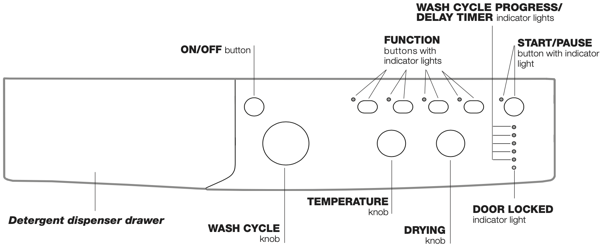
Detergent dispenser drawer: used to dispense detergents and washing additives.
ON/OFF button: switches the washer-dryer on and off.
WASH CYCLE knob: programmes the wash cycles. During the wash cycle, the knob does not move.
FUNCTION buttons with indicator light: used to select the available functions. The indicator light corresponding to the selected function will remain lit.
TEMPERATURE knob: sets the temperature or the cold wash cycle.
DRYING knob: used to set the desired drying programme.
WASH CYCLE PROGRESS/DELAY TIMER indicator lights: used to monitor the progress of the wash cycle. The illuminated indicator light shows which phase is in progress. If the Delay Timer function has been set, the time remaining until the wash cycle starts will be indicated
DOOR LOCKED indicator light: indicates whether the door may be opened or not.
START/PAUSE button with indicator light: starts or temporarily interrupts the wash cycles.
N.B. To pause the wash cycle in progress, press this button; the corresponding indicator light will flash orange, while the indicator light for the current wash cycle phase will remain lit in a fixed manner. If the DOOR LOCKED indicator light is switched off, the door may be opened.
To start the wash cycle from the point at which it was interrupted, press this button again.
Standby mode: This washing machine, in compliance with new energy saving regulations, is fitted with an automatic standby system which is enabled after a few minutes if no activity is detected. Press the ON-OFF button briefly and wait for the machine to start up again.
Indicator lights
The indicator lights provide important information. This is what they can tell you:
Delayed start
If the DELAY TIMER function has been activated, after the wash cycle has been started the indicator light corresponding to the selected delay period will begin to flash:
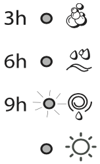
As time passes, the remaining delay will be displayed and the corresponding indicator light will flash:
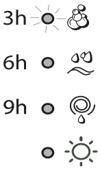
The set programme will start once the selected time delay has expired.
Wash cycle phase indicator lights
Once the desired wash cycle has been selected and has begun, the indicator lights switch on one by one to indicate which phase of the cycle is currently in progress.
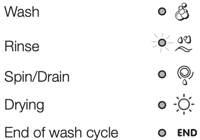
Note: when the drying cycle has finished, the DRYING knob should be returned to the “0” position.
Function buttons and corresponding indicator lights
When a function is selected, the corresponding indicator light will illuminate.
If the selected function is not compatible with the programmed wash cycle, the corresponding indicator light will flash and the function will not be activated.
If the selected function is not compatible with another function which has been selected previously, the indicator light corresponding to the first function selected will flash and only the second function will be activated; the indicator light corresponding to the enabled option will remain lit.
 Door locked indicator light
When the indicator light is on, the porthole door is locked to prevent it from being opened; make sure the indicator light is off before opening the door (wait approximately 3 minutes). To open the door during a running wash cycle, press the START/PAUSE button; the door may be opened once the DOOR LOCKED indicator light turns off.
! Fast flashing of the “programme phases” and DOOR LOCKED indicator lights indicate an anomaly
Wash cycle phase indicator lights/ins>
- Switch the washer-dryer on by pressing the ON/OFF button. All indicator lights will switch on for a few seconds, then they will switch off and the START/PAUSE indicator light will pulse.
- Load the laundry and close the door.
- Set the WASH CYCLE knob to the desired programme.
- Set the washing temperature.
- Set the drying cycle if necessary.
- Measure out the detergent and washing additives.
- Select the desired functions.
- Start the wash cycle by pressing the START/PAUSE button and the corresponding indicator light will remain lit in a fixed manner, in green. To cancel the set wash cycle, pause the machine by pressing the START/PAUSE button and select a new cycle.
- At the end of the wash cycle the indicator light will switch on. The door can be opened once the DOOR LOCKED indicator light turns off. Take out your laundry and leave the appliance door ajar to make sure the drum dries completely. Switch the washer-dryer off by pressing the ON/OFF button.
Specials wash cycles
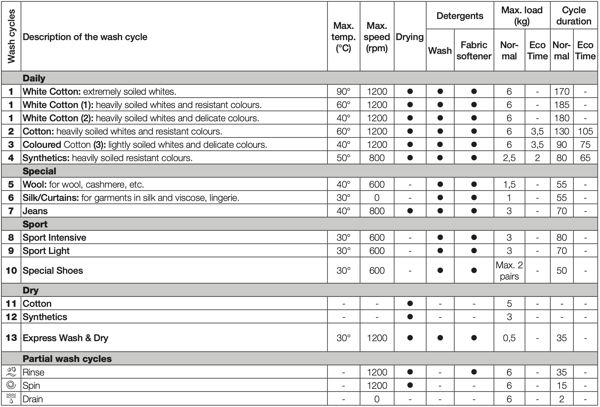
Sport Intensive (wash cycle 8) is for washing lightly soiled sports clothing fabrics (tracksuits, shorts, etc.); for best results, we recommend not exceeding the maximum load indicated in the “Table of wash cycles”. We recommend using a liquid detergent and dosage suitable for a half-load.
Sport Light (wash cycle 9) is for washing lightly soiled sports clothing fabrics (tracksuits, shorts, etc.); for best results, we recommend not exceeding the maximum load indicated in the “Table of wash cycles”. We recommend using a liquid detergent and dosage suitable for a half-load.
Sport Shoes (wash cycle 10) is for washing sports shoes; for best results, do not wash more than 2 pairs simultaneously.
Express Wash & Dry (wash cycle 13) was designed to wash and dry lightly soiled garments quickly. This cycle may be used to wash and dry a laundry load of up to 0.5 kg in just 35 minutes.
To achieve optimum results, use liquid detergent and pre-treat cuffs, collars and stains.
Personalisation
Setting the temperature - Turn the TEMPERATURE knob to set the wash temperature (see Table of wash cycles). The temperature may be lowered, or even set to a cold wash. The washer-dryer will automatically prevent you from selecting a temperature which is higher than the maximum value set for each wash cycle.
Setting the drying cycle - Turn the DRYING knob to select the desired drying option. There are two options:
- Based on time: From 40 minutes to 180.
- Based on the desired laundry dryness level:
- Iron dry: suitable for clothes which will need ironing afterwards. the remaining dampness softens creases, making them easier to remove.
- Hanger dry: ideal for clothes which do not need to be dried fully.
- Cupboard dry suitable for laundry which can be put back in a cupboard without being ironed.
If your laundry load to be washed and dried is much greater than the maximum stated load (see adjacent table), perform the wash cycle, and when the cycle is complete, divide the garments into groups and put some of them back in the drum. At this point, follow the instructions provided for a “Drying only” cycle. Repeat this procedure for the remainder of the load.
Table of Drying times (guideline values)
| Fabric type | Load type | Max. load (kg) | Cupboard dry | Hanger dry | Iron dry |
|---|---|---|---|---|---|
| Cotton | Clothing of different sizes, Terry towels | 5 | 180 | 170 | 140 |
| Synthetics | Sheets, Shirts, Pyjamas, socks, etc. | 3 | 140 | 120 | 100 |
Drying only
Use the cycle selector knob to select a drying cycle (11-12-13) in accordance with the type of fabric. The desired drying level or time may also be set using the DRYING knob.
Functions
The various wash functions available with this washer-dryer will help to achieve the desired results, every time. To activate the functions:
- Press the button corresponding to the desired function;
- the function is enabled when the corresponding indicator light is illuminated.
Note: If the indicator light flashes rapidly, this signals that this particular function may not be selected in conjunction with the selected wash cycle.
Eco Time - Selecting this option enables you to suitably adjust drum rotation, temperature and water to a reduced load of lightly soiled cotton and synthetic fabrics (refer to the “Table of wash cycles”). Eco Time enables you to wash in less time thereby saving water and electricity. We suggest using a liquid detergent suitably measured out to the load quantity.
! This function may not be used in conjunction with wash cycles 1, 5, 6, 7, 8, 9, 10, 11, 12, 13,  ,
,  ,
,  .
.
1200-600 - Press this button to reduce the spin speed
! This function may not be used in conjunction with wash cycles 6, 11, 12, 13, .
 Intensive Wash - Because a greater quantity of water is used in the initial phase of the cycle, and because of the increased cycle duration, this function offers a high-performance wash.
! This function may not be used in conjunction with wash cycles 5, 6, 7, 8, 9, 10, 11, 12, 13, , , .
 Delay timer - This timer delays the start time of the wash cycle by up to 9 hours. Press the button repeatedly until the indicator light corresponding to the desired delay time switches on. The fifth time the button is pressed, the function will be disabled. N.B. Once the START/PAUSE button has been pressed, the delay time can only be modified by decreasing it until launching the set programme.
! This option is enabled with all programmes.