Oven
Oven details
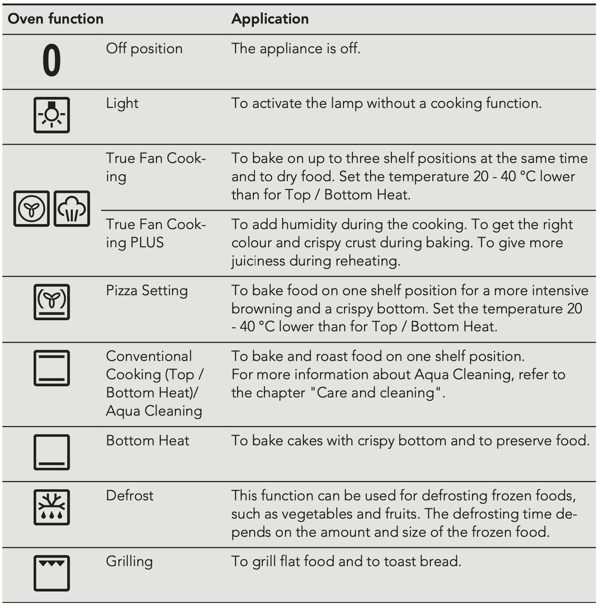
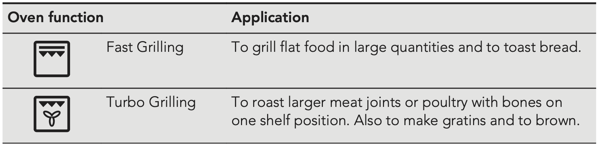
Oven Functions
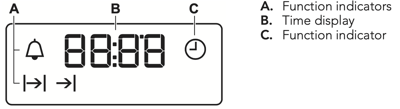
Display
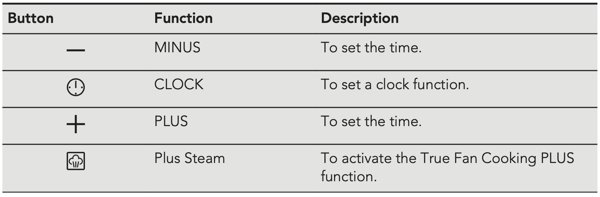
Buttons
Clock Functions
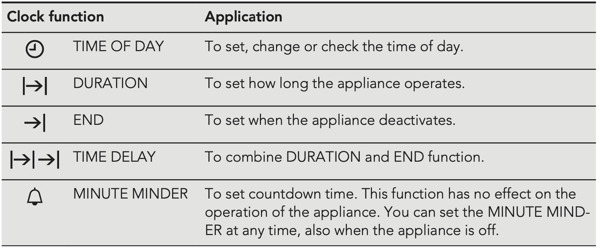
Setting the Time
You must set the time before you operate the oven.
The  flashes when you connect the appliance to the electrical supply, when there was a power cut or when the timer is not set.
Press the + or – to set the correct time.
After approximately five seconds, the flashing stops and the display shows the time of day you set.
To change the time of day press  again and again until starts to flash.
Setting the Duration
- Set an oven function and temperature.
- Press again and again until
 starts to flash.
 - Press + or – to set the Duration time.
- The display shows .
- When the time ends, flashes and an acoustic signal sounds. The appliance deactivates automatically.
- Press any button to stop the acoustic signal.
- Turn the knob for the oven functions and the knob for the temperature to the off position.
Setting the End
- Set an oven function and temperature.
- Press again and again until starts to
 flash.
 - Press + or – to set the End time.
- The display shows .
- When the time ends, flashes and an acoustic signal sounds. The appliance deactivates automatically.
- Press any button to stop the signal.
- Turn the knob for the oven functions and the knob for the temperature to the off position.
Setting the Time Delay
- Set an oven function and temperature.
- Press again and again until starts to flash.
- Press + or – to set the Duration.
- Press .
- Press + or – to set the End time.
- Press to confirm.
- Appliance turns on automatically later on, works for the set DURATION time and stops at the set END time. At the set time an acoustic signal sounds.
Setting the Timer
- Press again and again until
 starts to flash.
 - Press + or – to set the Timer.
- The Timer starts automatically after 5 seconds.
- When the set time ends, an acoustic signal sounds. Press any button to stop the acoustic signal.
- Turn the knob for the oven functions and the knob for the temperature to the off position.